

Config System#
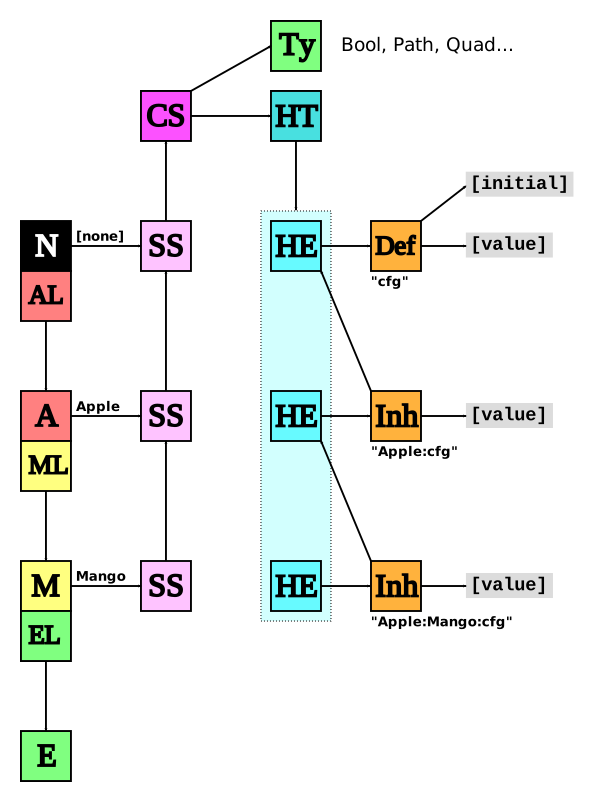
tl;dr This diagram is all you need to know :wink:
 |
Key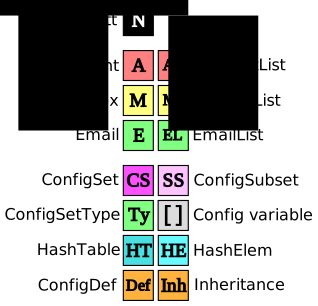 |
ConfigSet#
Configuration begins with the ConfigSet. It contains:
Hash Table to store the Configs
Set of registered Types
Set of Observers
First we create a ConfigSet and register some Types. Each Type is responsible for one data type. Each Type has:
Name |
Human-readable name |
|---|---|
setter/getter |
Set/get the variable as a string |
nsetter/ngetter |
Setter/getter as a native type, e.g. |
resetter |
Reset variable to factory settings |
destructor |
Release the resources |
Each Config Type implements the struct ConfigSetType interface
int      string_set         (const struct ConfigSet *cs, void *var,       struct ConfigDef *cdef, const char *value, struct Buffer *err);
int      string_get         (const struct ConfigSet *cs, void *var, const struct ConfigDef *cdef,                    struct Buffer *result);
int      native_set         (const struct ConfigSet *cs, void *var, const struct ConfigDef *cdef, intptr_t value,    struct Buffer *err);
intptr_t native_get         (const struct ConfigSet *cs, void *var, const struct ConfigDef *cdef,                    struct Buffer *err);
int      string_plus_equals (const struct ConfigSet *cs, void *var, const struct ConfigDef *cdef, const char *value, struct Buffer *err);
int      string_minus_equals(const struct ConfigSet *cs, void *var, const struct ConfigDef *cdef, const char *value, struct Buffer *err);
int      reset              (const struct ConfigSet *cs, void *var, const struct ConfigDef *cdef,                    struct Buffer *err);
void     destroy            (const struct ConfigSet *cs, void *var, const struct ConfigDef *cdef);
Note that the word “string” in these functions doesn’t refer to a String Config Type, but rather a user-entered string that will be converted to the Config Type.
Config Types#
NeoMutt’s Types are:
Name |
Description |
Source |
C Type |
|---|---|---|---|
Address |
Email address |
config/address.c |
|
Bool |
Boolean |
config/bool.c |
|
Enum |
Enumeration |
config/enum.c |
|
Long |
Long |
config/long.c |
|
Mbtable |
Multi-byte character table |
config/mbtable.c |
|
Number |
Number |
config/number.c |
|
Path |
Path |
config/path.c |
|
Quad |
Quad-option |
config/quad.c |
|
Regex |
Regular expression |
config/regex.c |
|
Slist |
List of strings |
config/slist.c |
|
Sort |
Sorting |
config/sort.c |
|
String |
String |
config/string.c |
|
Registering Config Names#
Each Config Name is represented by a ConfigDef. This links the user-facing Name of the Item to a registered Type and a global Variable.
Here are some examples:
// Name            Type|Flags                 Initial,   Data,        Validator
{ "timeout",       DT_NUMBER|DT_NOT_NEGATIVE, 600,       0,           NULL,
{ "move",          DT_QUAD,                   MUTT_NO,   0,           NULL,
{ "print_command", DT_STRING|DT_COMMAND,      "lpr",     0,           NULL,
{ "sort",          DT_SORT|DT_SORT_REVERSE,   SORT_DATE, SortMethods, pager_validator,
Notifications#
The Config Set implements a notification system using struct Notify. This
means that other code can register Observers of the Config and be notified when
anything changes.
Walkthrough of a Config Item#
Part 1 - Number#
This takes a fictional Config item “$foo_percentage”
NeoMutt defines the Number Type: DT_NUMBER which is backed by a short int.
The ‘foo’ module registers its variable:
// Name             Type|Flags Initial, Data, Validator,         Docs
{ "foo_percentage", DT_NUMBER, 42,      0,    foo_pct_validator, "Amount of foo" },
NeoMutt will set the value of the Variable (explanation below). Note: The initial value is Type-specific.
and an observer:
int foo_config_observer(struct NotifyCallback *nc);
Now we read the config file:
set foo_percentage = 96 # Dangerously high
mutt_parse_rc_line()reads the config filemutt_parse_rc_buffer()identifies the ‘set’ commandparse_set()splits the line into‘foo_percentage’ variable
the assignment ‘=’
the value string ‘96’
Lookup ‘foo_percentage’ in the ConfigSet HashTable
It has type
DT_NUMBER
Lookup
DT_NUMBERin the Type definitionsDelegate parsing to the “Number” Type
The “Number” Type has a ‘setter’ function to convert a string to data. If any of the steps fail, the user will be notified and the Variable won’t be changed.
Convert the string to an integer
Check the range of the integer (we store our value in a short)
Is it less than
SHRT_MIN?Is it greater than
SHRT_MAX?
Validator:
This variable has a validator function, which is now called. In this case, it checks that the value is in the range 0-100. If it’s not, it returns false and an error message.
If the validator succeeds, then the Variable is set to the new value. Finally, the ConfigSet sends out a notification to all the Observers.
foo_config_observer()is called
Part 2 - Address#
This takes a fictional Config item “$home_address”
NeoMutt defines the Address Type: DT_ADDRESS which is backed by a struct Address pointer.
The ‘foo’ module registers its variable:
// Name           Type|Flags  Initial,           Data, Validator, Docs
{ "home_address", DT_ADDRESS, "jim@example.com", NULL, NULL,      "Home address" },
‘home_address’ has type
DT_ADDRESSLookup ‘DT_ADDRESS’ in the Type definitions
Delegate parsing to the “Address” Type
Address Type:
Allocate a new struct Address
Parse the string into:
Real name
Email address
On success:
Free the old value, stored internally
Store the new value
Notify the Observers
On failure:
Free the temporary Address
Notify the user
This variable doesn’t have a validator function.
Part 2b - NULL#
Some Types will allow an empty value to be set. By default, NeoMutt stores empty strings as NULL.
Setting an Address Type to an empty string will release the old address.
Config Scope#
Main Config#
There are ~460 Config Names in NeoMutt. A third of these are defined in
mutt_config.c.
Library Config#
The rest of the Config Items have been moved into libraries.
This allows the libraries to reduce the scope of their Config Variables.
For example, the Sidebar
registers its
Config Items
in sidebar/config.c
// Name                    Type|Flags Initial, Data, Validator,
{ "sidebar_delim_chars",   DT_STRING, "https://neomutt.org/.",    0,    NULL,
{ "sidebar_divider_char",  DT_STRING, 0,       0,    NULL,
{ "sidebar_folder_indent", DT_BOOL,   false,   0,    NULL,
Global Config#
The Config Variables are still global – there’s only one value for each variable.
This is why when you switch Accounts you need to use account- and folder-hooks to set variables.
Config System#
The Config System supports inheritance which will allow us to create Account- and Mailbox-specific config.
This leads to my favourite diagram at the top of this page. Understanding this will lead to Enlightenment :-)
Config Subset#
The Config System can be accessed using a handle: struct ConfigSubset *sub
Initially, this will be the global scope, NeoMutt->sub.
Over time, this will be changed to Account->sub when Account-specific config is introduced, then eventually Mailbox->sub.
For dialogs, the ConfigSubset should be passed in as a parameter.
Reading the Config#
There’s a helper function for each config type.
These are strictly type-checked and will assert() on failure.
Here’s an example of each function.
const struct Address  *c_envelope_from_address = cs_subset_address(sub, "envelope_from_address");
const bool             c_fast_reply            = cs_subset_bool   (sub, "fast_reply");
const unsigned char    c_use_threads           = cs_subset_enum   (sub, "use_threads");
const long             c_imap_fetch_chunk_size = cs_subset_long   (sub, "imap_fetch_chunk_size");
const struct MbTable  *c_from_chars            = cs_subset_mbtable(sub, "from_chars");
const short            c_connect_timeout       = cs_subset_number (sub, "connect_timeout");
const char            *c_debug_file            = cs_subset_path   (sub, "debug_file");
const enum QuadOption  c_fcc_attach            = cs_subset_quad   (sub, "fcc_attach");
const struct Regex    *c_gecos_mask            = cs_subset_regex  (sub, "gecos_mask");
const struct Slist    *c_hidden_tags           = cs_subset_slist  (sub, "hidden_tags");
const short            c_pgp_sort_keys         = cs_subset_sort   (sub, "pgp_sort_keys");
const char            *c_pattern_format        = cs_subset_string (sub, "pattern_format");
Each variable is named to match the Config Variable and is const to discourage the coder from changing it (which would have no effect on the actual config).