

Event-Driven Sidebar#
A scheme for an event-driven Sidebar
Introduction#
This guide will show all the stages in setting up the Sidebar in an event-driven NeoMutt. It will list all the objects, their owners, and all the possible events that could affect the Sidebar.
Set Up#
NeoMutt initialised
config read
sidebar init called
register config
register colours
register commands
register functions
root windows created
Index
open mailbox
start index dialog
create dialog
create containers
create index, index bar
create pager, pager bar
create sidebar
create window
attach data
set up observers
attach data to dialog
create MailboxView, notify
sidebar will observe
create EmailViews, notify
Data Required#
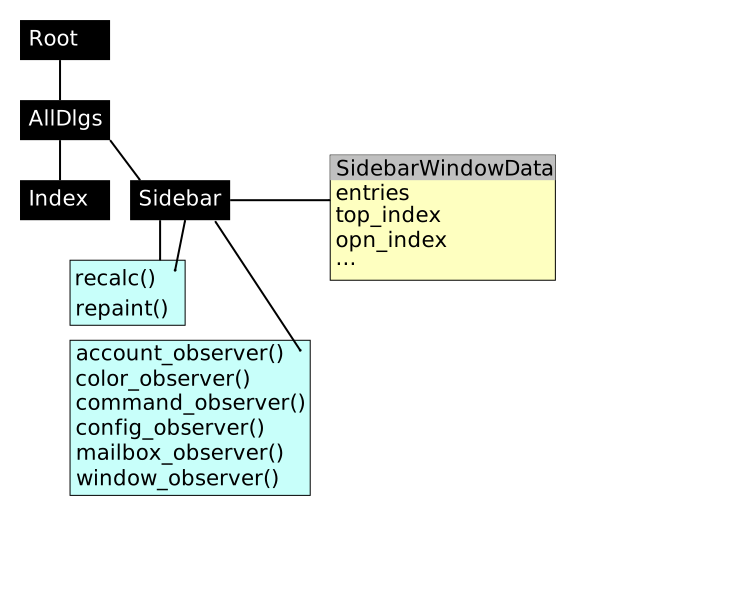
SidebarView
Account List
Mailbox List for each Account
MailboxView for each Mailbox
SBEntries[]
Index markers (4)
Updating#
All events begin in the event loop which waits for external events to happen. e.g.
Key presses are converted into functions
Terminal resize causes the Root Window to be resized
Anything that causes a change to a Subject (Data, View, Window, etc) will cause a notification to be sent out. The observer can then respond.
Note: The observer doesn’t take action yet. That will happen in the reflow or recalc stages.
After the event has been processed, the screen panels will be given a chance to refresh themselves. This happens in three stages:
:left_right_arrow: Reflow: If any windows have changed, the layout will be recalculated.
Any Windows that are resized will be notified.:gear: Recalc: If any Data has changed, the panels can recalculated what’s needed to refresh the screen.
This step may be time-consuming.:paintbrush: Repaint: This step should be an instantaneous redrawing of the panel.
Events#
Below is an exhaustive list of every event that affects the Sidebar.
Data/View Changes#
Data/View Change |
Affects |
Result |
|---|---|---|
Account new |
Displayed text |
:gear: recalc |
Account change |
Displayed text |
:gear: recalc |
Account deleted |
Displayed text |
:gear: recalc |
AccountView changed |
Displayed text |
:gear: recalc |
Mailbox new |
Displayed text |
:gear: recalc |
Mailbox changed |
Displayed text |
:gear: recalc |
Mailbox deleted |
Displayed text |
:gear: recalc |
MailboxView changed |
Displayed text |
:gear: recalc |
Config Changes#
Config Change |
Affects |
Result |
Notes |
|---|---|---|---|
ascii_chars |
Divider |
:paintbrush: repaint |
Unless character changes width |
folder |
Displayed text |
:gear: recalc |
|
sidebar_component_depth |
Displayed text |
:gear: recalc |
|
sidebar_delim_chars |
Displayed text |
:gear: recalc |
|
sidebar_divider_char |
Dividing line |
:paintbrush: repaint |
Unless character changes width |
sidebar_folder_indent |
Displayed text |
:gear: recalc |
|
sidebar_format |
Displayed text |
:gear: recalc |
|
sidebar_indent_string |
Displayed text |
:gear: recalc |
|
sidebar_new_mail_only |
Displayed text |
:gear: recalc |
|
sidebar_next_new_wrap |
Behaviour |
:heavy_check_mark: none |
|
sidebar_non_empty_mailbox_only |
Displayed text |
:gear: recalc |
|
sidebar_on_right |
Window position |
:paintbrush: repaint |
See: Window position |
sidebar_short_path |
Displayed text |
:gear: recalc |
|
sidebar_sort |
Displayed text |
:gear: recalc |
|
sidebar_visible |
Window visibility |
:left_right_arrow: reflow |
See: Window become visible/hidden |
sidebar_width |
Window size |
:left_right_arrow: reflow |
See: Window narrow/widen |
spoolfile |
Colour of text |
:paintbrush: repaint |
Colour Changes#
Colour Change |
Affects |
Result |
|---|---|---|
indicator |
Colour of text |
:paintbrush: repaint |
normal |
Colour of text |
:paintbrush: repaint |
sidebar_divider |
Colour of text |
:paintbrush: repaint |
sidebar_flagged |
Colour of text |
:paintbrush: repaint |
sidebar_highlight |
Colour of text |
:paintbrush: repaint |
sidebar_indicator |
Colour of text |
:paintbrush: repaint |
sidebar_new |
Colour of text |
:paintbrush: repaint |
sidebar_ordinary |
Colour of text |
:paintbrush: repaint |
sidebar_spoolfile |
Colour of text |
:paintbrush: repaint |
Functions#
Function |
Change |
Result |
Notes |
|---|---|---|---|
<sidebar-next-new> |
Move highlight |
:paintbrush: repaint |
Unless highlight moves offscreen, in which case :gear: recalc |
<sidebar-next> |
Move highlight |
:paintbrush: repaint |
Unless highlight moves offscreen, in which case :gear: recalc |
<sidebar-open> |
Open Mailbox |
:gear: recalc |
It’s possible that stats will change for the Mailbox |
<sidebar-page-down> |
Move display |
:gear: recalc |
|
<sidebar-page-up> |
Move display |
:gear: recalc |
|
<sidebar-prev-new> |
Move highlight |
:paintbrush: repaint |
Unless highlight moves offscreen, in which case :gear: recalc |
<sidebar-prev> |
Move highlight |
:paintbrush: repaint |
Unless highlight moves offscreen, in which case :gear: recalc |
<sidebar-toggle-virtual> |
none |
:heavy_check_mark: none |
Obsolete |
<sidebar-toggle-visible> |
Window visibility |
:left_right_arrow: reflow |
See: Window become visible/hidden |
Commands#
Command |
Affects |
Result |
|---|---|---|
sidebar_whitelist |
Displayed text |
:gear: recalc |
unsidebar_whitelist |
Displayed text |
:gear: recalc |
Window Changes#
These changes are the effect of other events, e.g. resizing the terminal, changing config. In some cases the result will depend on the exact setup of the screen. When possible, the Sidebar will just be repainted.
Window Change |
Result |
Notes |
|---|---|---|
Become taller |
:gear: recalc |
Only if there is more text to display, otherwise :paintbrush: repaint |
Become shorter |
:heavy_check_mark: none |
Unless highlight is moved offscreen, in which case :gear: recalc |
Become narrower |
:gear: recalc |
Affects sidebar_format |
Become wider |
:gear: recalc |
Affects sidebar_format |
Become moved |
:paintbrush: repaint |
If dimensions are the same, otherwise :gear: recalc |
Become visible |
:paintbrush: repaint |
If nothing else has changed, otherwise :gear: recalc |
Become hidden |
:heavy_check_mark: none |
Ignore :gear: recalc requests while hidden |
Examples#
These examples list all the notifications involved in some common tasks.
Config#
User sources a config file.
Processing
Config:
color error white red
Sidebar: No action (not relevant)Config:
color indicator white blue
Sidebar: No action (sidebar_indicator is set)Config:
color sidebar_flagged black yellow
Sidebar: Relevant, add repaint flag to Sidebar WindowConfig:
color sidebar_divider brightblack default
Sidebar: Relevant, add repaint flag to Sidebar Window
Update
:left_right_arrow: Reflow: no action
:gear: Recalc: no action
:paintbrush: Repaint: Sidebar is repainted
:bulb: Note: Repaint flag is set twice, but the Sidebar is only repainted once
Resize#
User makes the terminal shorter.
Processing
Terminal resized
NeoMutt receives
SIGWINCHRoot Window is resized to new dimensions
Update
:left_right_arrow: Reflow: Window sizes are recalculated
Sidebar is now shorter, so notification sent
Sidebar decides that recalculation is necessary (highlight isn’t on-screen)
:gear: Recalc: Sidebar recalculates screen text and set repaint flag
:paintbrush: Repaint: Sidebar is repainted
:bulb: Note: If the highlight had still been on-screen after the resize, the Sidebar would not have needed to recalc or repaint.
Independence#
The goal is to make the Sidebar completely independent. Achieving this would mean that a developer could then create a new panel without having to change large amounts of core code.
An independent panel would need to be able to dynamically define its own:
Config: This is already possible
Colours: More work is required to encapsulate the colours
Functions: Work is needed to make the functions extensible
Commands: Work is needed to make the commands extensible
Windows: Dialog/window notifications would allow a panel to insert itself into the window tree